
How to Keep Your Gaming Setup Clean, Organized, and Easy to Use
A clean gaming setup improves comfort, performance, and longevity of your gear. Whether you play on PC, console, or mobile, organization minimizes distractions and makes sessions more enjoyable.
This guide gives practical, actionable steps to tidy your space, manage cables, protect hardware, and set up systems that stay organized with minimal maintenance.
Plan Your Layout and Monitor Setup
Start by mapping the essentials: screen, input devices, consoles, and storage. Position your monitor(s) at eye level and at a comfortable distance—this reduces neck strain and keeps cables tidy. If you use wide or cinematic displays, consider an Ultrawide Gaming Monitors option to reduce the need for multi-monitor setups and simplify cable runs.
Choose the Right Desk, Mounts, and Stands
A desk with cable grommets and a dedicated shelf keeps peripherals off the main surface. Use a monitor arm to free up desk space and route cables neatly behind the screen—products like the ErGear Single Monitor Arm include integrated cable management and are easy to install.
Cable Management and Power Strategy
Cable clutter is the fastest way to make a setup feel messy. Group cables by function (power, display, peripherals), secure them with velcro ties or cable sleeves, and route them under the desk or behind trays. Keep a labeled power strip or a dedicated outlet for gaming gear, and choose reliable components—if you’re building a PC or upgrading parts, consider high-quality Gaming Power Supplies to ensure stable power delivery and reduce the chance of cable swaps and failures.
Controllers, Consoles, and Charging Stations
Dedicate a dock or shelf for each console and controller. A charging station not only charges controllers neatly but also serves as storage to prevent controllers from being left in random places. Look for a solution tailored to your system—using a dedicated Controller Charging Stations keeps controllers charged and reduces surface clutter.
Mobile Gaming: Keep Devices Readily Available
Mobile gaming can add a lot of small accessories to your desk—pads, fans, power banks, and earbuds. Use a simple stand to keep your phone at an ergonomic angle, prevent overheating from lying flat, and make the device easy to grab mid-session. A compact holder from the Phone Stands For Gaming category gives stability and frees up surface area while you play.
Protect, Clean, and Maintain Hardware
Regular cleaning prevents grime buildup that can affect performance and appearance. For screens and portable consoles, tempered glass or screen protectors reduce scratches and simplify cleaning—consider using reliable protectors like the Orzly Glass Screen Protectors. For keyboards and mice use compressed air, soft brushes, and gentle wipes. Schedule a quick surface clean weekly and a deeper gear cleaning monthly.
Peripherals and Surface Choices
Choose a mousepad and desk surface that match your style and maintenance tolerance. An oversized pad protects the desk and keeps keyboard and mouse aligned, while anti-slip backing prevents movement. RGB pads offer aesthetics but choose one with durable stitching to avoid fraying. A popular, easy-to-clean option is the TIDALSOIL RGB Gaming Mouse Pad, which balances size and maintenance needs.
Storage, Backups, and Performance Management
Keep games, captures, and system backups on fast, reliable storage. External drives are handy for transferring captures between devices; portable NVMe or SSD drives are compact and durable. The Samsung T7 Portable SSD is an example of a robust drive for storage and quick backups, which helps you clear internal storage and keep systems responsive.
Checklist: Quick Things to Do Today
- Clear and wipe the desk surface; remove snacks and cups.
- Route and tie cables into one bundle; label power cables.
- Dock controllers on a charging station; store batteries and dongles in a small box.
- Place phone on a dedicated stand and connect a charger or power bank.
- Use compressed air on keyboard and vents; clean screen protectors with a microfiber cloth.
- Back up recent game saves and captures to an external SSD.
Conclusion: A Practical Takeaway
Make organization habitual: 10 minutes of tidying after each session and a 30–60 minute monthly maintenance routine keeps your setup functional and inviting. Invest in one or two organizing tools that solve your biggest daily pain points—monitor arms, charging stations, and a good external SSD often provide the biggest improvements for the effort.
FAQ
-
How often should I clean my gaming gear?
Quick surface wipes weekly; compressed air and deeper cleaning monthly; internal PC dusting every 3–6 months depending on environment.
-
What’s the best way to hide cables?
Use cable sleeves, under-desk trays, and monitor-arm channels to keep power and data cables grouped and out of sight.
-
Should I keep consoles on or off the desk?
Keep consoles on a ventilated shelf or stand to allow airflow and to separate heat sources from fragile peripherals.
-
How do I prevent my phone from overheating during mobile gaming?
Use a stand to improve airflow, avoid direct sunlight, and consider a clip-on cooling fan or short play sessions to reduce thermal buildup.
-
Is an external SSD worth it for gamers?
Yes—fast external SSDs let you store captures, backup saves, and move large game files without clogging internal drives.
Products Featured in This Article
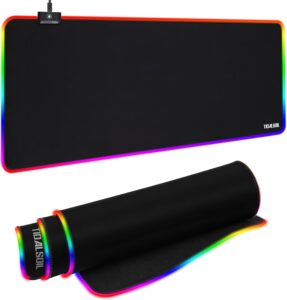
TIDALSOIL RGB Gaming Mouse Pad, 31….
From the brand TIDALSOIL for looking for the most authentic and immersive gaming experience and take…

Orzly Glass Screen Protectors Compa…
From the brand About Us Everyone in the Orzly team has a passion for tech, we…

Samsung T7 Portable SSD, 2TB Extern…
The Samsung Portable SSD T7 is the next standard in external storage. With transfer rates up…
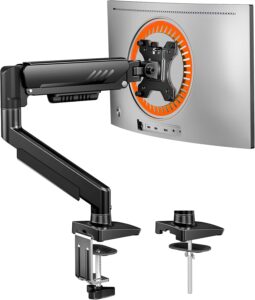
ErGear Single Monitor Arm, Fully Ad…
From the brand New Release Ergear Standing Desk ErGear Dual Monitor Mount Ergear Single Monitor Mount…