Console Gaming Setup Tips for a Smoother Experience
Whether you play on PS5, Xbox Series X/S, or Nintendo Switch, a few deliberate setup choices make sessions more comfortable, consistent, and enjoyable. This guide focuses on practical, low-friction improvements you can make with minimal expense and effort.
Read through the sections below for display, controller, power, cooling, ergonomics, and accessory tips you can apply today. Each recommendation is actionable and aimed at reducing interruptions and improving responsiveness.
Choose the Right Display for Your Play Style
Your display is the backbone of a console setup: choose based on resolution, refresh rate, and distance. For immersive single-player or racing games, consider wider aspect ratios and extra horizontal space. If you want a cinematic field of view and practical multitasking with media and apps, an ultrawide display can be an excellent choice—especially for setups where a monitor replaces a TV or sits close to the player. Ultrawide Gaming Monitors give more horizontal screen real estate and can reduce need for head-turning in cockpit-style games.
Optimize Your Controller Choice and Layout
Controllers are personal: prioritize feel, button layout, and configurable features. For PlayStation players wanting top-tier customization—adjustable triggers, back paddles, and profiles—a high-end model can be worth the investment. The extra precision and ergonomics can shave seconds off reaction times and keep your hands comfortable during long sessions. Consider professional-grade options known for durable components and programmable presets like the PlayStation DualSense Edge.
Xbox Players: Consider Pro-Level Controllers
Competitive and casual Xbox players both benefit from controllers with remappable inputs and premium sticks. If you want a customizable, robust option with removable parts and advanced tuning, look at elite-class controllers that offer adjustable dead zones and swappable modules to extend lifespan and maintain performance. For example, specialized elite controllers provide extra hardware customization that supports competitive play and personalized ergonomics. Vennom X-box Elite Controller Series is an example of that class of product.
Keep Controllers Charged and Ready
Dead controllers interrupt momentum. Reduce downtime by centralizing charging and keeping spare batteries or rechargeable packs on hand. A dedicated charging dock restores multiple controllers overnight and keeps them organized so you don’t have to hunt for cables before a session. For households with multiple controllers or frequent multiplayer sessions, a charging station is one of the highest-impact accessories. Browse units built for quick, safe charging and tidy storage: Controller Charging Stations.
Improve Console Cooling and Placement
Heat kills performance and shortens hardware life. Place consoles on open surfaces with 2–4 inches of clearance, avoid enclosed cabinets during long sessions, and keep vents unobstructed. If you stack devices or run intense titles for hours, an active cooling stand can help maintain stable fan profiles and reduce thermal throttling. For PS5 owners who value integrated cooling and a neat vertical/horizontal footprint, consider combo stands that add fans and controller charging while preserving airflow: PS5/Slim/Pro Stand and Cooling Station.
Nintendo Switch: Space-Saving and Portable Tips
The Switch is unique: docked console, handheld, and tabletop modes require flexible storage and protection strategies. Keep Joy-Cons or Pro Controllers in a consistent spot, and use compact stands or travel cases for portability. If you rely on a dedicated Switch controller for longer sessions, choose one with solid battery life and low-latency wireless performance to maintain a consistent experience. For Switch-specific controller options and accessories, check specialized controllers made for the platform: Lyyes Switch Controller.
Protect Screens and Key Surfaces
Small scratches or scuffs can be distracting and reduce resale value. For portable consoles and handhelds, a tempered glass protector adds crisp touch response and easier cleaning. For docked displays and portable monitors, use protective mats and stable stands to prevent slips. If you own a Nintendo Switch or similar handheld, applying a quality screen protector prevents chips and keeps touch accuracy intact: Orzly Glass Screen Protectors.
Accessories and Practical Add-Ons
Small accessories remove friction: controller stands, headset hooks, and a dedicated cable-management solution all speed setup and teardown. If you lean on the PS5 ecosystem or have multiple DualSense controllers, a targeted dual-charging dock designed for your controllers can simplify routines and cut cable clutter—keeping controllers charged, visible, and ready for play. A purpose-built charger is a small purchase with outsized convenience: NEWDERY for PS5 Controller Charger Station.
Checklist: Quick Setup Actions
- Confirm display resolution and refresh rate match your console’s output settings.
- Place console with 2–4 inches clearance from walls and obstructions.
- Use a dedicated charging station and keep one spare fully charged controller.
- Position seating so eyes are level with the top third of the screen to reduce neck strain.
- Label and route power/HDMI cables with clips or a cable sleeve for easy access.
- Apply screen protectors to handhelds and store docks on stable surfaces.
- Test network connection and prefer wired Ethernet for multiplayer stability when possible.
FAQ
- How important is refresh rate for consoles? Higher refresh rates improve responsiveness for compatible games and can reduce perceived input lag; use the highest stable refresh rate your console and display support.
- Should I keep my console vertical or horizontal? Both orientations are fine if ventilation is clear; choose the orientation that fits your space while keeping vents unobstructed and stable.
- Are third-party controllers reliable? Many third-party controllers offer excellent value and extra features, but check build quality, warranty, and user reviews before purchasing.
- Can cooling stands damage the console? Quality stands designed for specific models preserve airflow and are safe; avoid aftermarket stands that block vents or apply pressure to fragile components.
- Is wired or wireless audio better for console gaming? Wired headsets generally have lower latency and no battery concerns; wireless headsets add convenience—choose based on your priorities.
Conclusion
Small, targeted upgrades—right display, reliable controllers, a charging routine, and proper ventilation—create a smoother console experience. Start with one change from the checklist and build a setup that reduces interruptions and keeps you playing longer with less frustration.
Products Featured in This Article

PlayStation DualSense Edge Wireless…
Get an edge in gameplay by creating your own custom controls to fit your playstyle. Built with…

Vennom X-box Elite Controller Serie…
Product description We Proudly Customize in USA Original Micro-Soft X-box Elite Series 2 Controller using Hydro-dip…
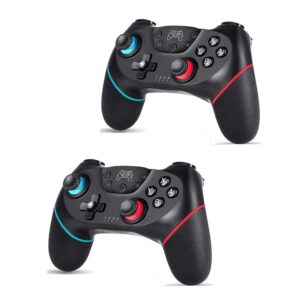
Lyyes Switch Controller, Wireless P…
Product description Durable quality and outstanding performance controllers Turbo Features: 1.Press and hold one action button,…
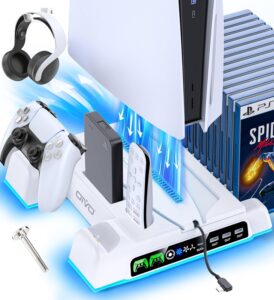
PS5/Slim/Pro Stand and Cooling Stat…
Product description The video showcases the product in use.The video guides you through product setup.The video…
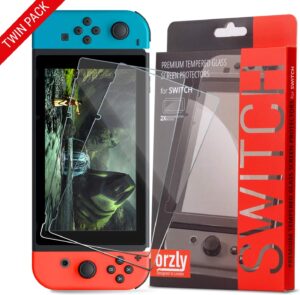
Orzly Glass Screen Protectors Compa…
From the brand About Us Everyone in the Orzly team has a passion for tech, we…

NEWDERY for PS5 Controller Charger …
Product description The video showcases the product in use.The video guides you through product setup.The video…