

How to Build a Better Gaming Setup Without Overspending
Upgrading your gaming setup doesn’t have to mean blowing your budget. With deliberate choices and a focus on the components that most affect play, you can significantly improve comfort, responsiveness, and immersion for a modest outlay.
This guide breaks down practical, cost-effective steps—what to prioritize, where to save, and which targeted purchases deliver the best returns on experience.
1. Start by defining goals and budget
Before buying anything, identify what matters most: higher FPS, smoother visuals, better comfort for long sessions, or console convenience. Rank three priorities and assign a realistic budget. If you want quick product ideas and bundles tailored to gamers, check the main catalog at DailyGameCodes to spot deals and categories that align with your plan.
2. Choose the right monitor for your needs
Monitors are one of the biggest perceived upgrades. Aim for a model that matches your goals and GPU capability—higher refresh rates for competitive play, higher resolution for immersion, or ultrawide for workspace and simulation games. If you value smoothness first, look at 144Hz Gaming Monitors to find balanced options that don’t cost as much as premium 240Hz or 4K panels.
3. Focus on the PC components that affect gameplay most
When building or upgrading a PC, prioritize the motherboard and CPU socket compatibility to protect future upgrades. A quality board lets you reuse parts longer—consider models like the ASUS TUF Gaming Z790-Plus WiFi for a balance of features and longevity if you plan to upgrade CPUs or add fast storage later. Spending a bit more on a solid motherboard reduces costly replacements down the road.
4. Pick peripherals that improve play without premium prices
Peripherals are an easy way to boost comfort and performance. A well-fitting mouse and responsive keyboard can make gameplay feel noticeably better. Lightweight, accurate mice provide gains in aiming and reduce fatigue—look at options like the ATK VXE Dragonfly R1 SE+ Wireless Gaming Mouse for a low-weight, budget-friendly wireless pick that suited competitive play without a premium price.
5. Console additions that make sessions cleaner and easier
If you game on consoles, small accessories can provide outsized value—charging solutions, storage cases, and quality controllers. A twin charging dock keeps controllers ready and reduces clutter; a reliable example is the PowerA Twin Charging Station, which saves time and avoids frequent battery swaps. Carrying cases and controller grips are inexpensive and useful for portability or preserving hardware.
6. Desk layout, ergonomics, and cable management
A good ergonomic setup reduces strain more than many pricey peripherals. Invest in a comfortable chair, adjust monitor height to eye level, and keep keyboard/mouse at elbow height. Cable management and a tidy surface improve focus and reduce accidental disconnections. Small desktop upgrades—like a large mouse pad that doubles as a phone stand—are cheap and practical; consider the RGB Gaming Mouse Pad with Wireless Charging if you want combined desk organization and convenience without separate purchases.
7. Targeted upgrade paths that give the best value
When money is limited, pick upgrades that yield the largest improvement per dollar. Common high-value steps:
- Boost storage performance with an external or internal SSD for faster load times—fast portable drives like the Lexar D70E 512GB Dual Drive can speed up installs and portability.
- Add RAM if you’re below 16GB—this helps modern games and multitasking.
- Upgrade to a better power supply and case cooling only if you add higher-power components; otherwise, save budget for the GPU/SSD/RAM.
Choose one or two upgrades at a time to spread costs and maintain compatibility.
8. Maintenance and longevity—keep your setup working longer
Regular maintenance prevents unexpected replacements. Clean dust from fans and filters, verify cable integrity, and check thermal paste and airflow yearly. Replacing aging case fans with efficient models improves temperatures and keeps noise low; consider options like the AsiaHorse AMICI-5GT RGB PC Fans for quiet, visually consistent cooling if you want both performance and aesthetics.
Small habits—like shutting down for a deeper clean every few months and using surge protection—lengthen component life and reduce long-term costs.
- Set clear goals and budget before shopping.
- Prioritize monitor refresh rate or GPU-resolved resolution based on your games.
- Upgrade storage and RAM first for the biggest everyday gains.
- Invest in a good mouse and tidy desk setup over flashy, expensive extras.
- Maintain components with periodic cleaning and firmware updates.
FAQ
Q: Should I buy a 240Hz monitor or a 144Hz monitor?
A: If you’re competitive and your GPU can consistently push 200+ FPS in your primary titles, 240Hz makes sense. For most players a quality 144Hz Gaming Monitor is a better value and pairs well with mid-range hardware.
Q: Is wireless better than wired for gaming mice?
A: Modern wireless mice offer low-latency performance comparable to wired for most players and reduce cable drag. For strict budget builds, wired models can be cheaper; for a balance of comfort and performance, lightweight wireless options like the ATK VXE series are a strong choice.
Q: What should I upgrade first in an older PC?
A: Start with RAM (to at least 16GB) and storage (SSD) for smoother boot times and gameplay. Then evaluate GPU and monitor pairing. If your platform is old, prioritize a motherboard/CPU upgrade only if needed for compatibility with newer components.
Q: Are RGB accessories worth the cost?
A: RGB adds personal flair and can improve perceived value, but it rarely affects performance. If lighting matters to you, pick affordable RGB items that also serve a function, like a mouse pad with wireless charging, so you get utility and style.
Q: How do I avoid bottlenecks when upgrading one component?
A: Match upgrades to the weakest link: a high-end GPU paired with a very old CPU can limit performance. Research typical CPU/GPU pairings for your target games and consider balanced upgrades rather than one expensive component alone.
Conclusion
Building a better gaming setup on a budget is about prioritized choices: define what matters, invest in components that affect your core experience (monitor, storage, RAM, mouse), and use cheap, high-impact accessories for comfort and convenience. Small, smart purchases and regular maintenance yield a setup that feels premium without the premium price tag.
Products Featured in This Article
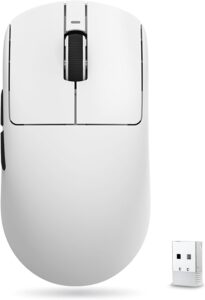
ATK VXE Dragonfly R1 SE+ Wireless G…
Product description 1 MCU 2 Coating 3 Sensor 4 Tri-Mode 5 HUB Extremely-Light-weight & Ergonomic Design:…
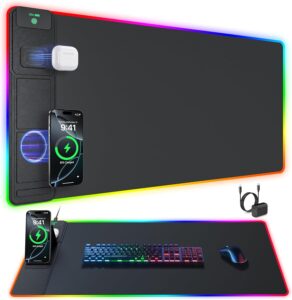
RGB Gaming Mouse Pad with Wireless …
From the model abc.mat: Mouse Pads Reinvented At abc.mat, we redefine the mouse pad expertise with…

PowerA Twin Charging Station for Du…
Cost and show your DualSense™ Wi-fi Controllers with the formally licensed Twin Charging Station for PlayStation…
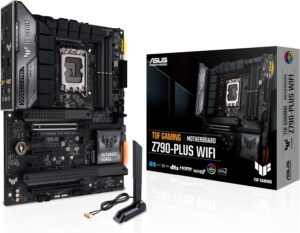
ASUS TUF Gaming Z790-Plus WiFi LGA …
ASUS TUF GAMING Z790-PLUS WiFi takes all of the important components of the newest 14th,thirteenth Gen…

Lexar D70E 512GB Dual Drive Externa…
Product description Authorized Disclaimers USB-C: As much as 2000MB/s learn and 1800MB/s write speeds. USB-A: As…

AsiaHorse AMICI-5GT RGB PC Fans, In…
Product description Why do I want to purchase each Ahead fan blades (exhaust) and reverse fan…